

The Bottleneck Wasn't Code. It Was Context.
How I built an engineering workspace that reduced coordination overhead and made engineering work feel cumulative.

Most AI tools improve one narrow part of engineering work: writing code faster.
In my experience, writing code was rarely the biggest bottleneck.
The real friction lived everywhere around the code. Rebuilding context. Reading old tickets. Tracing behaviour across services. Understanding past decisions. Checking CI pipelines. Figuring out who needed to review what. Recovering after interruptions.
Individually, none of these tasks were difficult. Together, they consumed a surprising amount of engineering time.
That’s what led me to build an AI-native engineering workspace.
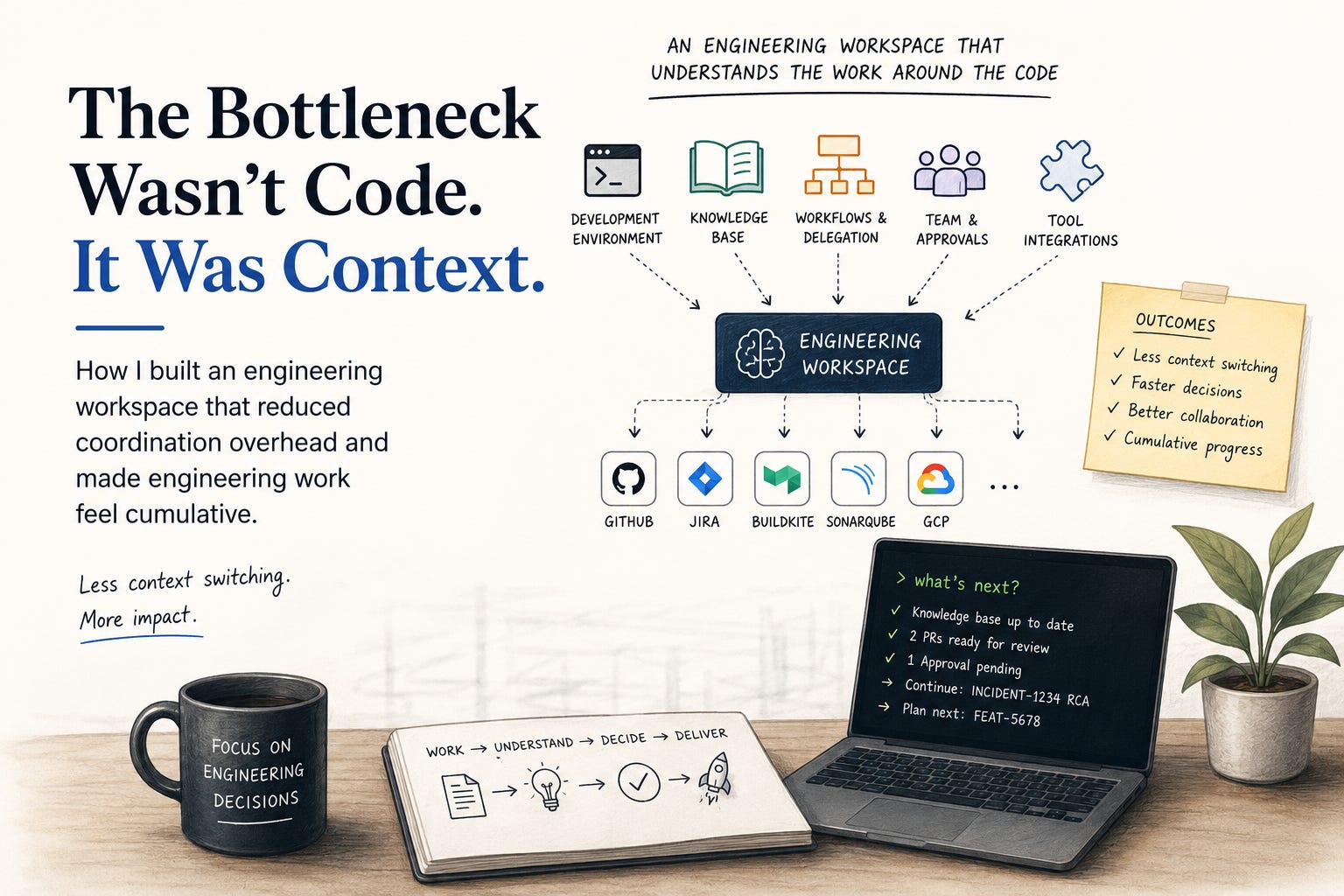
Not another coding assistant. A workspace designed around the reality of engineering work, where context, workflows, approvals, knowledge, and operational tools work together instead of existing in separate silos.
For me, it became much more than a repository. It became a development environment, an operating model, and a workflow layer for my engineering.
Why I Built It
I built this because too much of my day was being spent on coordination overhead.
A typical task rarely started with code. It started with gathering context. Opening tickets, reading historical discussions, tracing requests across services, validating local setup, checking build status, and understanding previous decisions before I could confidently make the next one.
The biggest slowdown was not the complexity of the work itself.
It was the repeated cost of stitching together information spread across systems, tools, and people.
I wanted a single workspace that could:
Provide a reproducible development environment
Preserve system knowledge and historical context
Route work through the right workflow
Understand team ownership and approval processes
Connect seamlessly to the tools surrounding the code
That combination ended up changing my day-to-day productivity far more than any individual AI feature ever did.
What The Workspace Looks Like
At a high level, the workspace is built from six layers:
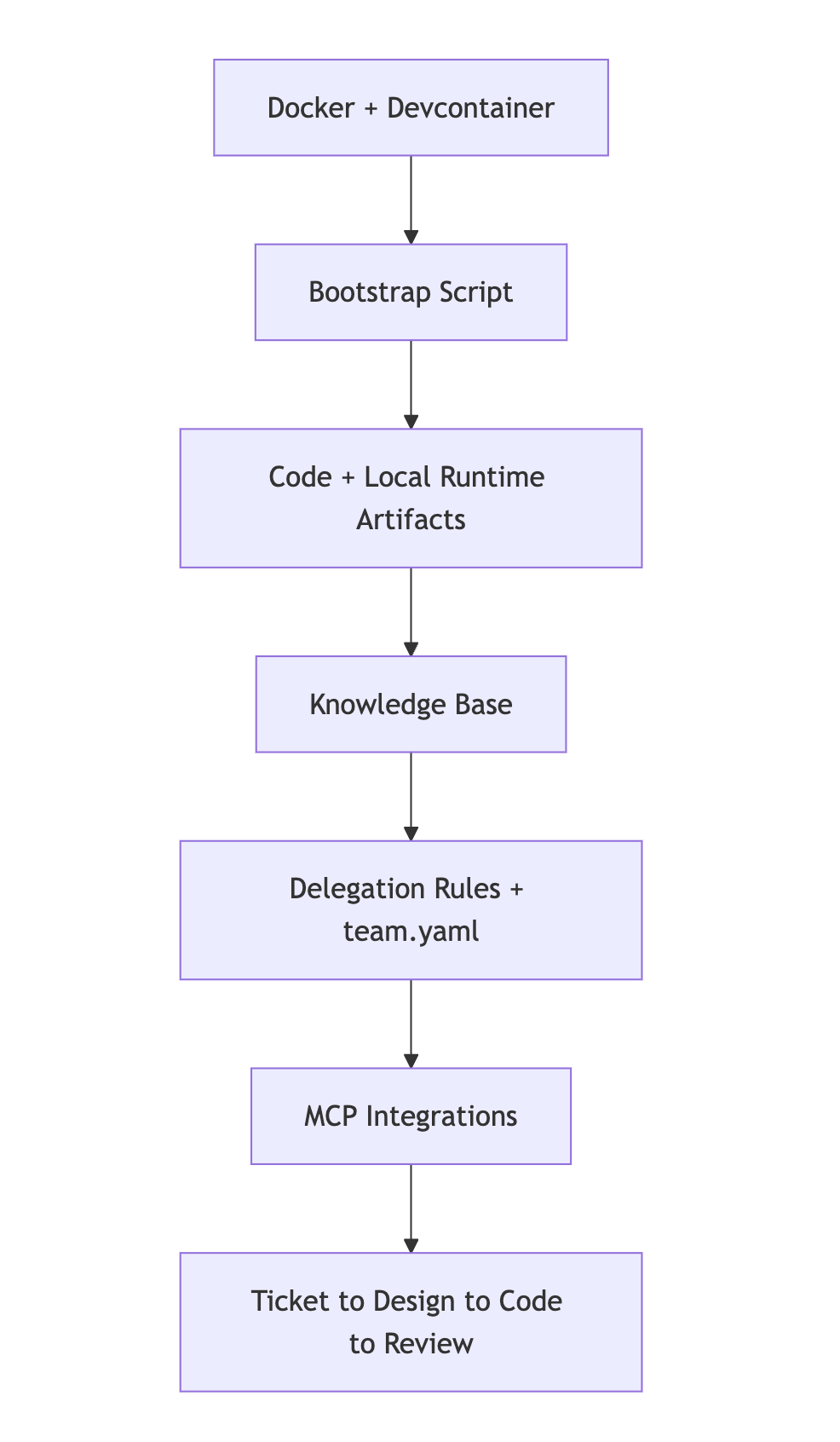
Each layer removes a different kind of friction. Together they make the workspace feel less like a chat tool and more like a working system.
The Devcontainer Is The Foundation
The workspace would not be useful if setup was painful, so the first principle was reproducibility.
The environment is Docker-first. The root compose setup gives me a stable Linux workspace, mounted source, persistent caches, and Docker access from inside the container. On top of that, the devcontainer provides the actual toolchain: Java, Maven, Node, Android SDK support, terminal defaults, editor extensions, and the environment variables needed for the projects in the workspace.
That matters because it removes startup uncertainty. I do not need to remember which version of Java works, whether Node will break, whether Gradle is installed, or whether I am missing some machine-specific setup from months ago. I reopen in container and start from a known baseline.
This is not just convenience. It is productivity insurance.
The Bootstrap Script Turns The Container Into A Real Workspace
The devcontainer gives me the shell. The setup script turns it into an actual engineering environment.
It handles the repetitive work that otherwise steals time at the start of a session:
validates
.envpresence for token-based integrationsclones or updates the source repos used in the workspace
installs workspace-managed
.cursorruleswhere neededinitializes submodules
creates
.context-local/runtime/for per-ticket artifactscopies
.devcontainer/mcp.jsoninto.cursor/mcp.jsonpre-pulls Testcontainers images
warms Maven, Gradle, Yarn, and npm dependencies
checks emulator connectivity for the mobile workflow
This is one of the least glamorous parts of the setup, but it is one of the most valuable. A lot of engineering time disappears into local drift and repeated setup work. Capturing that in code means I stop paying the same tax over and over.
The Knowledge Base Makes The Agent Useful Beyond Code Generation
Without a knowledge base, an agent only knows the current prompt and whatever files it reads on demand. That works for small edits. It does not work well for system-level tasks.
The knowledge base gives the workspace durable memory. It captures architecture, APIs, events, dependencies, flows, and implementation patterns. Just as important, it tracks freshness, so the system can tell when knowledge is stale and should be rebuilt.
That changes the quality of the interaction dramatically.
Instead of asking the agent to search blindly, I can ask it to explain a flow, estimate impact, reason about a change, or investigate a production issue with actual structural context behind the answer.
That is one of the biggest reasons this setup feels productive: I spend less time reconstructing the system from scratch.
The Delegation Rule Is What Makes The Workflows Reliable
One of the smartest parts of the workspace is the dispatcher rule.
I did not want a single vague AI prompt trying to do everything. I wanted explicit workflows. So the workspace routes commands like plan <ticket>, analyze <ticket>, implement <ticket>, review <ticket>, investigate <symptom>, and what's next to different rule files with different behavior.
That seems simple, but it creates a lot of leverage:
scope is clearer
outputs are more consistent
phases do not bleed into each other
prompts become reusable commands instead of handcrafted requests
In other words, the workspace delegates by intent. When I use a command, I am not just starting a conversation. I am invoking a contract.
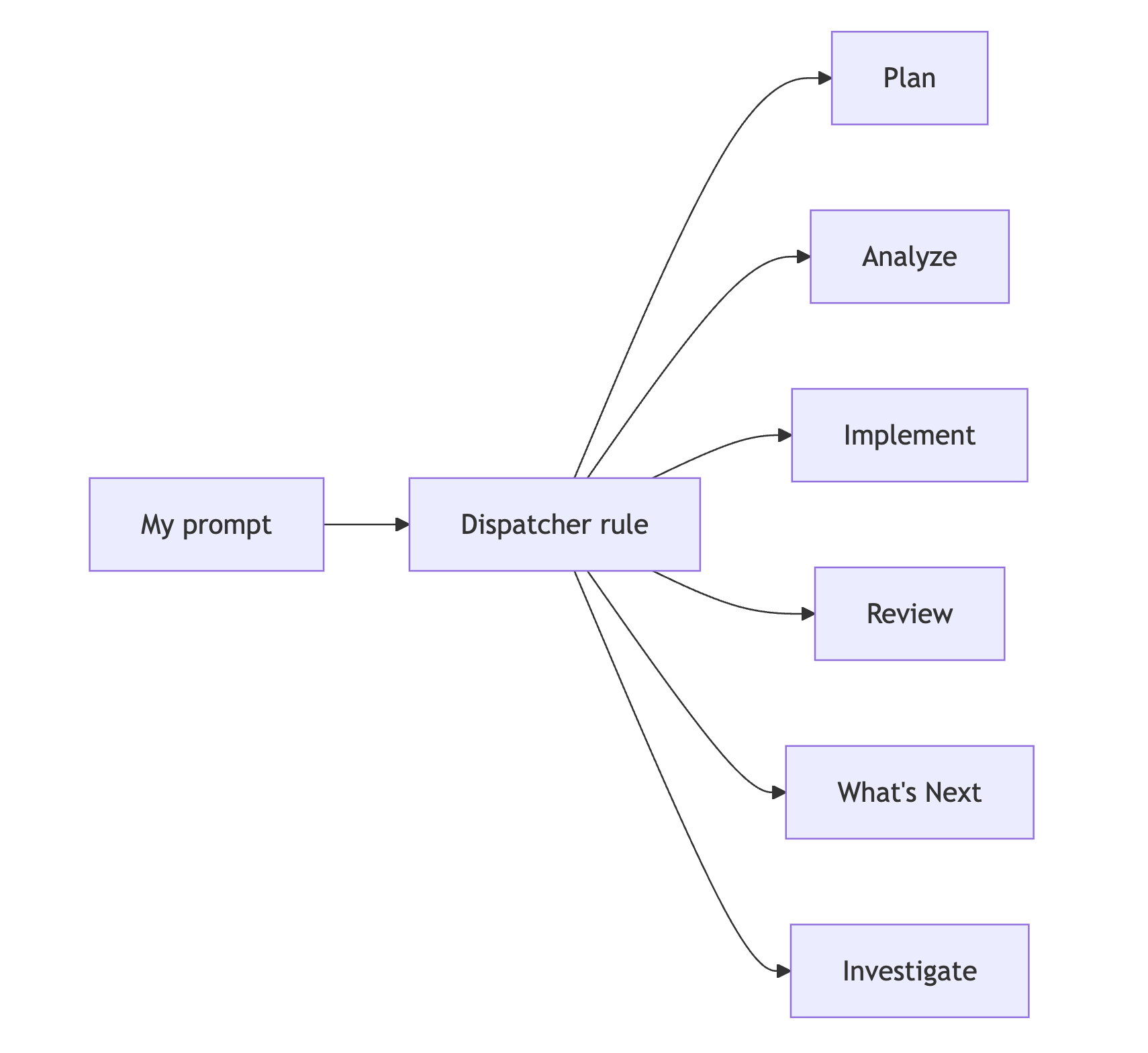
This is a major productivity win because it reduces prompt-writing overhead and makes the workspace much easier to trust.
team.yaml Makes The Workspace Aware Of Human Workflow
Most AI systems can generate a decent answer. Fewer systems understand who needs to act on it.
team.yaml solves that by giving the workspace a model of the team: members, roles, JIRA identities, GitHub identities, tagging rules, and approval gates.
That means the workspace can do more than prepare an artifact. It can route that artifact into the right human workflow.
For example, it can:
resolve who should approve planning or design work
determine whose approval actually counts
mention the right JIRA usernames in the correct format
add watchers intentionally
stop progress when approval conditions are not met
That last part matters. The review-gate logic checks whether an approval came from an authorized approver, not just whether someone wrote “LGTM.” That is a subtle but important improvement. It keeps the system fast without making it sloppy.
MCP Is What Turned This Into An Operational Workspace
The biggest jump in usefulness came from MCP integration.
Without MCP, the agent can help me think and edit local files. With MCP, it can operate across the systems that actually shape engineering work: tickets, pull requests, CI, internal knowledge, and quality signals.
In this workspace, MCP connects the agent to:
GitHub
JIRA
Buildkite
Glean
SonarQube
GCP-related tooling
local filesystem access
Some of these integrations run via Docker, others over HTTP. The important point is that they are part of the same loop. The agent can move from code to ticket, from ticket to CI, from CI to a local artifact, and from there to the next recommended action.
That removes a huge amount of manual context translation.
The Best Example: Incident Work Became Sharper And Faster
One of the clearest examples of productivity gain came from incident analysis.
In this workspace, I used the incident flow to produce a detailed RCA for an automatic ticket-creation failure. The output was not just a summary paragraph. It was a structured artifact with impact, timeline, technical analysis, evidence, root cause, resolution steps, and action items.
Why does that matter? Because work like that normally requires bouncing across ticket history, platform details, code, infrastructure clues, and prior assumptions. In this setup, the workflow is designed to gather those pieces, structure them, and save them back into a ticket-scoped artifact.
The value was not “the AI wrote a document for me”. The value was that the workspace reduced the time needed to assemble evidence, structure the investigation, and preserve the result.
Another Example: what's next Reduced Decision Friction
The what's next workflow is smaller, but it has probably saved me more daily friction than almost anything else.
It does not guess. It inspects state:
knowledge-base freshness
local git state
assigned JIRA work
linked PR state
local runtime artifacts
pending approvals
That means when I ask what to do next, I get an answer grounded in the actual condition of the workspace, not a generic suggestion.
This is especially useful after interruptions. Instead of manually reconstructing context, I can ask once and resume quickly.
Why The Runtime Artifact Model Matters
Another high-leverage choice was storing work under .context-local/runtime/ by ticket.
That means research, tech specs, incident reports, reviews, and approval state are not trapped in a long chat thread. They become durable working files tied to the task they belong to.
This improves productivity because:
I can pause and resume without losing context
the agent can continue from prior artifacts instead of starting over
one phase naturally feeds the next
ticket history becomes inspectable locally
This is one of the reasons the workspace feels cumulative. It does not just help in the current moment. It preserves momentum.
Why This Felt Like A 10x Productivity Improvement
I do not mean 10x in a simplistic benchmark sense. I mean that the dead time in my workflow dropped sharply.
I spend less time:
rebuilding context
fixing local setup
rewriting prompts
moving between tools manually
figuring out who needs to approve what
recovering after interruptions
And I spend more time on the parts of engineering that actually need judgment: design choices, edge cases, trade-offs, risk, and communication.
That is the real multiplier.
Closing Thought
What changed my productivity was not one AI feature. It was combining a devcontainer, a bootstrap script, a knowledge base, delegation rules, team.yaml, MCP integrations, and ticket-scoped artifacts into one coherent setup.
Once those pieces started working together, the workspace stopped feeling like a tool and started feeling like leverage.